bypass
Anti-Cheat Bypass
This script will bypass the Anti-Cheat's security against switching tabs, exiting fullscreen, etc.
How to execute a script?
Executing a script is a simple process once you know how to do it. It's easier to do on PCs and laptops, but there are also methods for mobile devices. In some cases it might be also not possible, but we will cover that as well.
Below are the most common ways to run a script on different platforms.
Method 1: Developer Tools (Recommended)
This is the most reliable way to run scripts on most devices. The process is similar across all platforms, but the way to open DevTools varies. Here are the steps for each device type:
How to open DevTools and run a script on PC / Laptop?
You can open the DevTools using any of these shortcuts:
- Press
Ctrl + Shift + J(Windows) orCmd + Option + J(Mac) or - Right-click anywhere on the page and select Inspect or
- Click on the three dots menu in the top right corner of your browser, go to More tools, and select Developer tools or
- Press the
F12key on your keyboard.
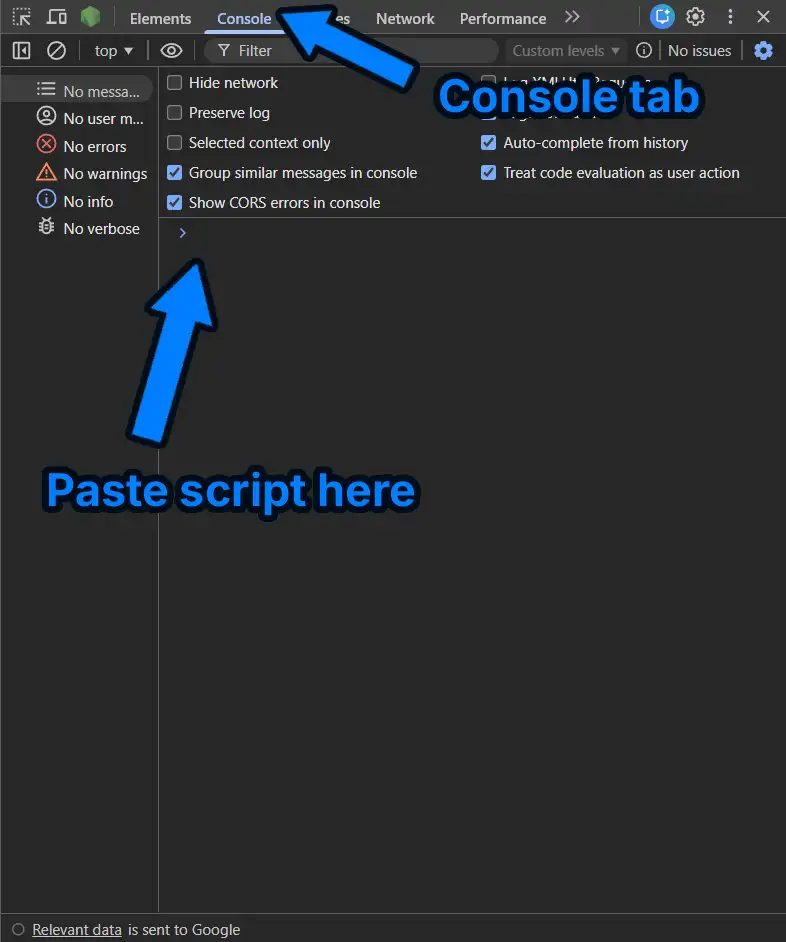
After opening DevTools, click on the Console tab at the top. This is where you will paste your script.
Once console is open:
- Click next to the blue
>symbol at the bottom. - Paste your script (
Ctrl + V). - Press Enter on your keyboard to run it.
How to open DevTools and run a script on iOS?
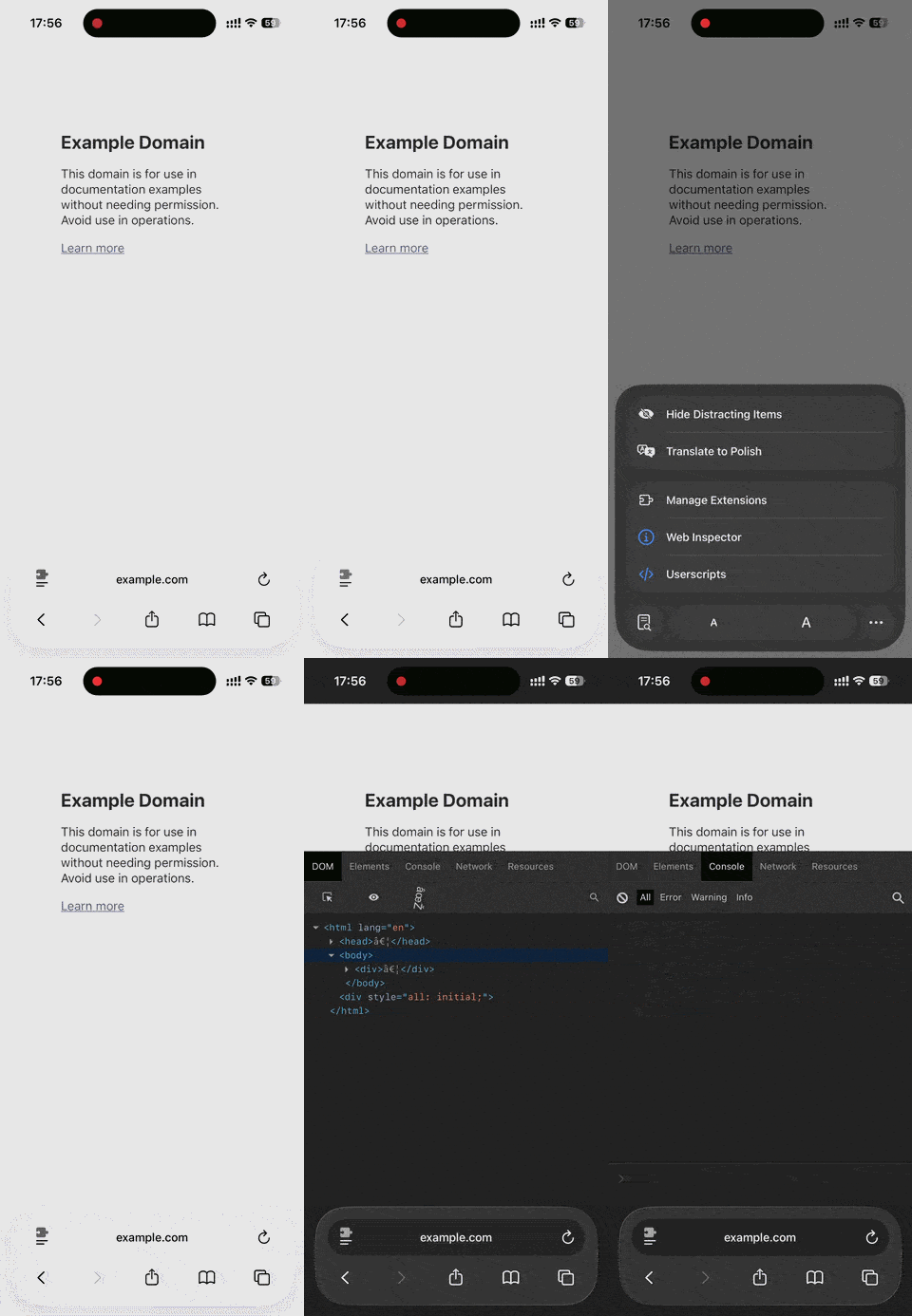
Safari doesn't include a DevTools console by default, so you need an browser extension:
- Download the Web Inspector extension from the App Store.
- Open Safari, tap the puzzle piece icon in the address bar, and enable Web Inspector.
- Once enabled, tap it again to open the DevTools window.
- Paste your script and press Enter on your on-screen keyboard.
Troubleshooting iOS:
- If tapping the icon does nothing, try refreshing the page.
- In your iPhone Settings > Safari, make sure Block Pop-ups is turned off if the script needs to open a window.
How to open DevTools and run a script on Android?
Standard mobile Chrome doesn't support scripts, so you'll need a different browser.
We always highly recommended Kiwi Browser for Android, but it has been removed from the Play Store.
- If you already have it, great! If not, you can download it from APKPure (do it at your own risk!).
- Open the website you want to use.
- Tap the three dots (⋮) in the top right corner.
- Scroll down and select Developer tools.
- Tap the Console tab.
- Paste your script and press Enter.
Method 2: Bookmark
You can create a bookmark that runs the script. Remember that you should remove bookmarks and add them again for each new script you want to run.
How to run a script using bookmarks on PC / Laptop?
- Copy your bookmark version script.
- Right-click your Bookmarks Bar (the bar below the link) and click Add Page. (If you don't see the Bookmarks Bar, press
Ctrl + Shift + Bto show it). - Name it something like "Run Script".
- In the URL or Address box, delete the link and paste your bookmark version script.
- Go to the website you want to use it on and simply click the bookmark you just created.
How to run a script using bookmarks on Mobile (Android & iOS)?
- Copy your bookmark version script.
- Open your browser's menu and add the current page to your bookmarks.
- Click on "Edit" button for the bookmark you just created.
- Delete the URL and paste your bookmark version script in its place. Also change the name to something like "Run Script" for easier access.
- Save the bookmark, go to the website you want to use it on and again click on the browser menu, then Bookmarks, and select the bookmark you just edited to run the script.
Method 3: "URL Bar" Trick
If all else fails, try this.
- Copy your bookmark version script.
- Click on the address bar (where the website link is) at the top of your browser.
- Delete everything inside it.
- Type exactly
javascript:(with the colon!) and then paste your bookmark version script right after it. - Press Enter.
Important: Most browsers automatically remove the javascript: part when you paste it for security. If it doesn't work, make sure you manually typed javascript: before the script.
Still not working?
If none of these methods work, your device or browser might have Administrator Restrictions. This is very common on School Chromebooks or work laptops where the school/company has blocked "Developer Tools" and "External javascript execution" for safety. Unfortunately, there is no way to bypass this without using a personal device. In such scenarios, we recommend using your own, unrestricted device to run the scripts.
What is the Anti-Cheat Bypass?
Wayground (Quizizz) has an anti cheat system that watches for players leaving the game tab or exiting fullscreen during live games. When it detects this, it flags you, warns the host, and can even kick you out of the game.
Our Anti-Cheat Bypass script blocks this detection completely - switch tabs, check your notes, exit fullscreen, and Wayground won't suspect a thing.
What is the Wayground (Quizizz) Anti Cheat?
Wayground (Quizizz) uses focus detection to check whether players are actually looking at the game. During a live game it monitors:
- Tab switching - leaving the game tab for even a moment
- Fullscreen exits - leaving the fullscreen game view
- Window focus loss - clicking away from the game window
If any of these happen, the game sends a player infraction report to the host. The host can then see who left and apply penalties. That's why you sometimes get a "please return to the game" warning even when you only wanted to quickly check something.
Important: If Wayground flags you for switching tabs, that's the platform's anti cheat doing its job - it's not a problem with our cheat. The Anti-Cheat Bypass script is the solution for it.
How to use the Anti-Cheat Bypass script?
- Join your Wayground (Quizizz) game and stay in the lobby.
- Open the Anti-Cheat Bypass script page.
- Copy the script (Console or Bookmark version).
- Execute it BEFORE the game starts.
Why does it have to be executed before the game?
The script must be running when the game begins so that no infraction is ever reported. If you run it after you've already switched tabs, Wayground may have already recorded the infraction.
Don't know how to run a script? Check out the How to execute a script guide for step-by-step instructions.
Availability
The Anti-Cheat Bypass script is a Professional plan feature. You can find it:
- In the Utils menu on the answers page after retrieving answers for your quiz
- On the dedicated Anti-Cheat Bypass page
Upgrade to Professional to unlock it along with all other premium features.